Once upon a time, Lodash was the Swiss Army knife of front-end projects. Need array dedupe, deep clone, or a quick debounce? Your muscle memory typed import _ from 'lodash' before your coffee cooled.
But the times—and the language — have changed.
This isn’t about Lodash “messing up.” It’s about JavaScript growing up. Native APIs got beefy, our utility needs got smaller and more targeted, and a new wave of lighter, modular tools is stealing the spotlight.
So… it’s time to say it: Goodbye, Lodash.
What Is Lodash?
Lodash is a comprehensive JavaScript utility library first released in 2012. It brought reliable, high-performance helpers to an era when native JS APIs were… let’s call them “youthful.”
Rooted in functional programming, Lodash ships utilities for arrays, objects, strings, and functions, and runs in both Node.js and browsers.
Common highlights include:
- Array helpers:
_.chunk,_.difference,_.compact - Object helpers:
_.assign,_.pick,_.omit - String helpers:
_.camelCase,_.trim - Function helpers:
_.debounce,_.throttle,_.curry
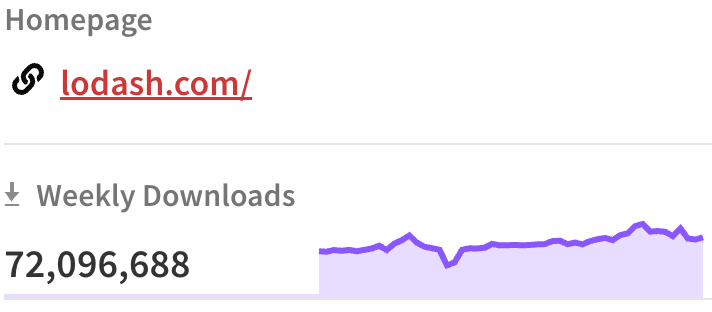
For years, it was as standard as jQuery. Even today, Lodash still sees 70–80 million weekly downloads on npm. Not bad for a legend.
So Why Move On?
Lodash solved real problems for a long time. But in modern front-end stacks, the trade-offs are harder to ignore.
1) Native JavaScript Covers More (and Reads Better)
Since ES6, JavaScript has shipped a flood of useful features that overlap with Lodash’s greatest hits:
| Lodash | Native JavaScript |
|---|---|
_.find | Array.prototype.find |
_.filter | Array.prototype.filter |
_.map | Array.prototype.map |
_.reduce | Array.prototype.reduce |
_.assign | Object.assign |
_.get | Optional chaining ?. |
Example
// Lodash
const name = _.get(obj, 'user.profile.name');

// Native JS
const name = obj?.user?.profile?.name;
Native code is concise, fast, and dependency-free—like switching from a moving truck to a backpack.
2) Bundle Size Still Matters
Yes, Lodash supports modular imports (lodash-es), but it’s still easy to accidentally pull more than you need. One stray default import and you’ve added a double-digit KB tax. Tree-shaking isn’t always perfect across toolchains either, so “just import only what you use” can turn into “why is my bundle 24KB heavier?”
3) TypeScript Experience Isn’t First-Class
Lodash’s types live in community declarations. They work, but:
- Inference can get fuzzy—especially in chain sequences
- Higher-order functions may lose precise return types
- Generics aren’t as ergonomic as modern TS libraries
In 2025, TypeScript is basically table stakes. Lodash can feel a half-step behind.
4) Slower Project Momentum
The last major Lodash release was 4.17.21 (2020). That’s an eternity in web years. Security patches, ES2021+ niceties, and ecosystem fit aren’t moving fast. Lodash didn’t fail; it simply finished its mission.
Okay, What Should We Use Now?
For features that exist natively—just use native JS. For the rest, reach for a modern utility set like ES-Toolkit.
What Is ES-Toolkit?
ES-Toolkit is a community-maintained utility library focused on being lightweight, fast, and type-safe. It’s not trying to be “all of Lodash.” It’s aiming at the daily must-haves you actually use.
Why developers like it:
- Faster: Built on native methods and modern patterns; often 2–3× quicker than older implementations
- Smaller: Fully tree-shakeable; import only what you use (bundle savings north of 90% are common)
- Type-safe: Written in TypeScript with rock-solid types
- Practical compatibility:
es-toolkit/compathelps swap in for Lodash with minimal fuss - Used in the wild: Adopted by projects like Storybook, Recharts, and CKEditor
Quick example
// Lodash
import _ from 'lodash';
const result = _.chunk([1, 2, 3, 4], 2);

// ES-Toolkit
import { chunk } from 'es-toolkit';
const result = chunk([1, 2, 3, 4], 2);
Lodash vs ES-Toolkit at a Glance
| Feature | Lodash | ES-Toolkit |
|---|---|---|
| Performance | Older implementations | Modern, often 2–3× faster |
| Bundle size | Easy to over-import | Tree-shakeable, import-by-function |
| TypeScript | Community types | First-class, built-in types |
| Maintenance | Last major update in 2020 | Actively maintained |
| Compatibility | Broad legacy support | Modern-first; Lodash-compat layer available |
Migration in 5 Simple Steps
- Install ES-Toolkit
npm install es-toolkit - Replace imports
// Before import _ from 'lodash'; const res = _.chunk(arr, 2); // After import { chunk } from 'es-toolkit'; const res = chunk(arr, 2); - (Optional) Use the compat layer if you rely on many Lodash functions:
import { chunk } from 'es-toolkit/compat'; - Run your tests to confirm behavior parity.
- Uninstall Lodash
npm uninstall lodash
Parting Words
Lodash was foundational. It carried us when JavaScript was still learning to tie its shoes. But today:
- Native JS is powerful
- TypeScript is standard
- We want performance, maintainability, and crisp types
This isn’t a takedown—it’s a graduation. With respect and gratitude: Goodbye, Lodash.
FAQ
Q1: Do I have to remove Lodash entirely?
Not necessarily. You can keep it where it’s deeply embedded and replace it gradually. Low-risk areas (like _.get and _.assign) are easy wins with native JS.
Q2: Will ES-Toolkit break my build?
It’s modular and tree-shakeable. Use named imports (import { x } from 'es-toolkit') and you’ll keep bundles lean. If you need broader coverage, try es-toolkit/compat.
Q3: What about older browsers?
ES-Toolkit targets modern environments. If you must support legacy browsers, use the compat layer plus appropriate polyfills, or stick to Lodash in that slice.
Q4: Is performance really better?
In many cases, yes—thanks to native primitives and modern patterns. Always benchmark in your app, but most teams see speed-and-size gains.
Q5: Any gotchas with TypeScript?
You’ll likely get better types. Just ensure your TS config matches your build (ES modules, module resolution, etc.) for the smoothest DX.