Add this to <head> and your page will auto-follow the OS light/dark theme, including native form controls:
<meta name="color-scheme" content="light dark">Then layer your brand colors with CSS variables + prefers-color-scheme. Optional manual toggle if you want a “midnight switch.”
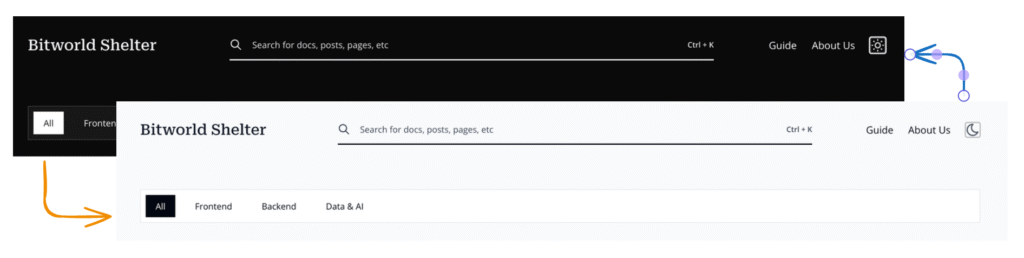
Why this tag exists (and why you should care)
Users live in dark mode. Your website… often doesn’t. Without guidance, the browser plays it safe (white background, black text, light inputs), which looks jarringly out of place on a dark system.<meta name="color-scheme"> is a polite note to the browser: “Hey, I support both themes; please render defaults appropriately.” You get:
- Correct default background/text colors.
- Native controls (inputs, selects, scrollbars) that match the OS theme.
- Less “flash of wrong theme” during page load.
The 60-second starter
<!doctype html>
<html lang="en">
<head>
  <meta charset="utf-8">
  <meta name="color-scheme" content="light dark">
  <meta name="viewport" content="width=device-width, initial-scale=1">
  <title>Auto Theme Demo</title>
</head>
<body>
  <h1>Hello, color-scheme!</h1>
  <input placeholder="Type here…">
</body>
</html>
No CSS yet—still works. The browser will pick light or dark defaults to match the system. Magic? No, standards. (Which is the boring kind of magic.)
Make it yours: CSS variables + prefers-color-scheme
Defaults are nice; brand colors are nicer. Use custom properties, then override for dark mode.
<head>
  <meta name="color-scheme" content="light dark">
  <style>
    /* Base (light) */
    :root {
      --bg: #ffffff;
      --text: #222;
      --link: #2c5282;
      --card-bg: #f7f7f9;
      --card-border: #e5e7eb;
      --shadow: 0 2px 4px rgba(0,0,0,.08);
    }

    /* Dark overrides */
    @media (prefers-color-scheme: dark) {
      :root {
        --bg: #121212;
        --text: #eaeaea;
        --link: #8ab4f8;
        --card-bg: #1e1e1e;
        --card-border: #3b3b3b;
        --shadow: 0 2px 6px rgba(0,0,0,.35);
      }
    }

    /* Apply */
    html, body { height: 100%; }
    body {
      margin: 0;
      background: var(--bg);
      color: var(--text);
      font: 16px/1.6 ui-sans-serif, system-ui, -apple-system, Segoe UI, Roboto, Arial, sans-serif;
    }
    a { color: var(--link); text-decoration: none; }
    a:hover { text-decoration: underline; }

    .card {
      background: var(--card-bg);
      border: 1px solid var(--card-border);
      box-shadow: var(--shadow);
      padding: 1rem 1.25rem;
      border-radius: 8px;
      max-width: 720px;
      margin: 2rem auto;
    }
  </style>
</head>
Pro tip: the meta tag helps the browser pick the baseline. Your CSS variables take it from “works” to “this looks like your brand.”
Components & native controls
If you style inputs heavily, they might ignore the UA theme. Keep them variable-driven:
:root {
  --input-bg: #fff;
  --input-border: #d1d5db;
}
@media (prefers-color-scheme: dark) {
  :root {
    --input-bg: #2a2a2a;
    --input-border: #4b5563;
  }
}
input, select, textarea {
  background: var(--input-bg);
  color: var(--text);
  border: 1px solid var(--input-border);
  border-radius: 6px;
  padding: .6rem .75rem;
}Images & icons that change with theme
Light logo on dark, dark logo on light—no more Franken-headers:
<picture>
  <source srcset="/logo-white.png" media="(prefers-color-scheme: dark)">
  <img src="/logo-black.png" alt="Brand logo" width="160" height="36">
</picture>
SVG icons? You can color them via currentColor and let text color do the work.
Optional: give users a manual “Night Mode” switch
System-following is default. A toggle lets users override.
<button id="theme-toggle" aria-label="Toggle theme">🌓</button>
<script>
  const root = document.documentElement;
  const saved = localStorage.getItem('theme'); // 'light' | 'dark' | null

  // Respect saved choice, else follow system
  const prefersDark = matchMedia('(prefers-color-scheme: dark)').matches;
  if (saved) root.dataset.theme = saved;
  else root.dataset.theme = prefersDark ? 'dark' : 'light';

  document.getElementById('theme-toggle').addEventListener('click', () => {
    root.dataset.theme = root.dataset.theme === 'dark' ? 'light' : 'dark';
    localStorage.setItem('theme', root.dataset.theme);
  });
</script>

<style>
  /* Tell the browser which schemes you actually use to style UA bits */
  :root { color-scheme: light dark; }

  /* Variables from earlier… plus classless override using [data-theme] */
  [data-theme="light"] { /* keep base values */ }
  [data-theme="dark"] {
    --bg: #121212;
    --text: #eaeaea;
    --link: #8ab4f8;
    --card-bg: #1e1e1e;
    --card-border: #3b3b3b;
    --shadow: 0 2px 6px rgba(0,0,0,.35);
    /* …and any others you use */
  }

  /* Apply background/text as before */
</style>
Put the script as early as possible in
<head>(or inline before heavy CSS) to reduce the “flash of wrong theme.” If you want to be extra, hide until ready:
body { opacity: 0; transition: opacity .15s ease; }
html[data-ready] body { opacity: 1; }
<script>document.documentElement.setAttribute('data-ready','');</script>Common gotchas (and how not to step in them)
- Hard-coded backgrounds
body { background: #fff; }will ignore dark mode. Use variables and override via media query or[data-theme]. - Over-styled inputs
If you replaced everything with custom gradients and resets, UA theming can’t help you. Keep styles variable-driven, or accept the maintenance burden. - Flash of wrong theme (FOIT’s moody cousin)
Inline your theme variables in<head>. Consider the quick pre-paint script above. - Images with white boxes in dark mode
Prefer transparent PNG/SVG. Or provide dark-friendly alternates with<picture>. - Assuming the meta tag replaces CSS
It doesn’t. It sets expectations for UA defaults. Your brand styles still live in CSS.
Browser support (human edition)
Modern browsers: yes. Old edge cases: also yes (but not old IE; pour one out). If a niche browser ignores the tag, your CSS prefers-color-scheme still carries you.
If you need a belt and suspenders:
if (!CSS.supports('color-scheme: light dark')) {
  document.documentElement.classList.add(
    matchMedia('(prefers-color-scheme: dark)').matches ? 'dark' : 'light'
  );
}Pocket checklist
- Add
<meta name="color-scheme" content="light dark">. - Define colors as CSS variables; override with
prefers-color-scheme: dark. - Keep inputs and components variable-driven.
- Use
<picture>(orcurrentColorSVGs) for theme-aware assets. - (Optional) Manual toggle +
localStorage. - Inline critical theme CSS to avoid flashes.
Closing thoughts
Dark mode isn’t a design trend anymore—it’s table stakes. The <meta name="color-scheme"> tag is the low-effort, high-impact on-ramp: let the browser align the basics with the OS, then sprinkle your brand across both themes with a handful of variables.
Got a gnarly edge case? Ran into a component that refuses to vibe in the dark? Drop your war stories and hacks in the comments—bonus points for the funniest “why is my input still bright white” screenshot.
Further Reading / References
Docs & Specs
- MDN: meta name=”color-scheme”
- MDN: CSS color-scheme
- MDN: prefers-color-scheme media query
- W3C: CSS Color Adjustment Level 1
Browser Guides & Deep Dives
- web.dev: Improved dark mode defaults with color-scheme
- Chrome Developers: Auto Dark Theme
- WebKit Blog: Dark Mode Support in WebKit
Browser UI Theming
- MDN: meta name=”theme-color”
- CSS-Tricks: Meta Theme-Color and Trickery
- UseYourLoaf: Safari 15 Theme Color
Testing & DevTools
- Chrome DevTools: Rendering → Emulate dark mode
- Stack Overflow: Emulate prefers-color-scheme in Chrome